
Zenus VR2.3.1 - App Store
You'll be able to see results in few seconds.
Publisher Description
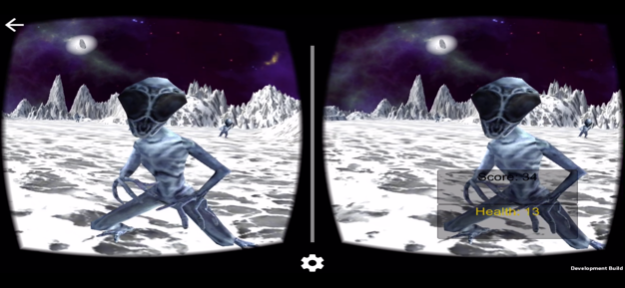
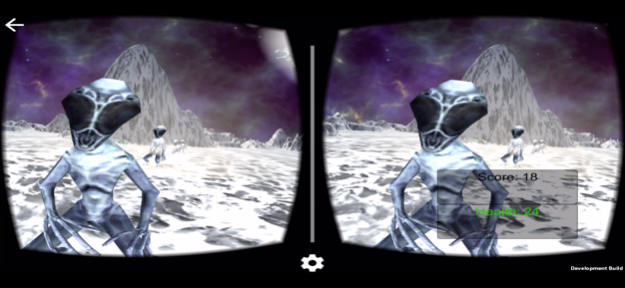

Published on VRFocus.com and various VR news outlets http://www.vrfocus.com/2016/05/survive-alien-attacks-in-zenus-vr-now-launched-on-google-cardboard/
Zenus VR is an outer space virtual reality first-person shooter, set out 2,000 years in the future! Zenus VR delivers a futuristic first person experience that has been optimized to deliver a competitive, immersive and seamless experience in Virtual Reality!
STORY:
You are the lone human survivor on the eerie planet of Zenus and the inhabitants don't take kindly to visitors!
Your presence is not welcome and your only goal is to make it out alive!!!!
Use your VR-headset as your Laser Ray Goggles to survive!!!!!
Known compatible VR Headsets: Google Cardboard, Boxzr VR, Merge VR, Homido VR, Zeiss VR One, Freefly VR, Durovis Dive, I Am Cardboard or any other Cardboard or iOS compatible VR Headset!
Features:
• Virtual Reality Mode
• Choice of automatic shooting or headset trigger shooting
• Powerful laser weapon upgrades (The longer you survive, the more powerful your weapon becomes!)
• Special effects and animated sceneries
• Game Center integration
• Powerful Immersion
• Minimum iPhone requirement is iPhone 4s or later
Follow us on Facebook, Instagram and Twitter @ZenusVR
Please read Privacy Policy before playing
May 28, 2020
Version 2.3.1
Bug fixes
About Zenus VR
The company that develops Zenus VR is Gboinyee Tarr. The latest version released by its developer is 2.3.1.
To install Zenus VR on your iOS device, just click the green Continue To App button above to start the installation process. The app is listed on our website since 2020-05-28 and was downloaded 0 times. We have already checked if the download link is safe, however for your own protection we recommend that you scan the downloaded app with your antivirus. Your antivirus may detect the Zenus VR as malware if the download link is broken.
How to install Zenus VR on your iOS device:
- Click on the Continue To App button on our website. This will redirect you to the App Store.
- Once the Zenus VR is shown in the iTunes listing of your iOS device, you can start its download and installation. Tap on the GET button to the right of the app to start downloading it.
- If you are not logged-in the iOS appstore app, you'll be prompted for your your Apple ID and/or password.
- After Zenus VR is downloaded, you'll see an INSTALL button to the right. Tap on it to start the actual installation of the iOS app.
- Once installation is finished you can tap on the OPEN button to start it. Its icon will also be added to your device home screen.
Program Details
System requirements
Download information
Pricing
Version History
version 2.3.1
posted on 2020-05-28
May 28, 2020 Version 2.3.1
Bug fixes
version 2.2
posted on 2019-08-10
Aug 10, 2019 Version 2.2
Updates and fixes to minor bugs
version 1.0
posted on 2016-05-09
version 2.3.1
posted on 1970-01-01
28 maj 2020 Version 2.3.1
Bug fixes
version 2.2
posted on 1970-01-01
2019年8月10日 Version 2.2
Updates and fixes to minor bugs
Disclaimer
Official App Store Link
We do not host Zenus VR on our servers. We did not scan it for viruses, adware, spyware or other type of malware. This app is hosted by Apple and passed their terms and conditions to be listed there. We recommend caution when installing it.
The App Store link for Zenus VR is provided to you by apps112.com without any warranties, representations or guarantees of any kind, so access it at your own risk.
If you have questions regarding this particular app contact the publisher directly. For questions about the functionalities of apps112.com contact us.
